




Today, we are pleased to announce the release of CFEngine 3.27.0! The code word for this release is exploration.
This release also marks an important event, the beginning of the 3.27 LTS series, which will be supported for 3 years.
Several new features have been added since the release of CFEngine 3.24 LTS, in the form of non-LTS releases. In this blog post we’ll highlight the most important features since the previous LTS release, even though some of them technically landed in intermediate non-supported releases.
What’s new
3.27 sneak peek webinar episode
In the Halloween special of our monthly webinar, we looked at some of the new features coming in 3.27:
Explore your infrastructure with the CFEngine AI agent
Inside Mission Portal, CFEngine users can now ask questions about their infrastructure and get answers based on the reporting data. This works by adding an integration with one of the supported AI providers. We currently support OpenAI, Anthropic and Google Gemini. Local / on-prem LLMs are also supported, via either Ollama or software providing an OpenAI compatible API.

Read more about this feature in our documentation:
https://docs.cfengine.com/docs/3.27/web-ui/ai-agent/
CMDB redesign
The CMDB has been redesigned to provide a more intuitive and user-friendly experience. The UI is now more oriented around what the user enters and wants to achieve, rather than the underlying data structure.

cfbs analyze and convert
Although cfbs is a separate tool, with it’s own versioning, we thought it would make sense to mention some new features here.
cfbs analyze- Analyze your policy set, showing which version of the default policy it’s based on, what files have custom modifications, and whether there are some unexpected mismatches (for example individual files from an older version).cfbs convert- Convert a traditionally managed policy set to a CFEngine Build project. Traditionally, policy sets have been managed as “forks” of the default policy, with custom modifications on top. By converting to a CFEngine Build project, you can take advantage of CFEngine Build and its tooling. This allows you to easily upgrade the base version with one simple command, to add modules made by the community, and to minimize the amount of customizations you have to maintain.
These new commands are available in cfbs version 5.5.0.
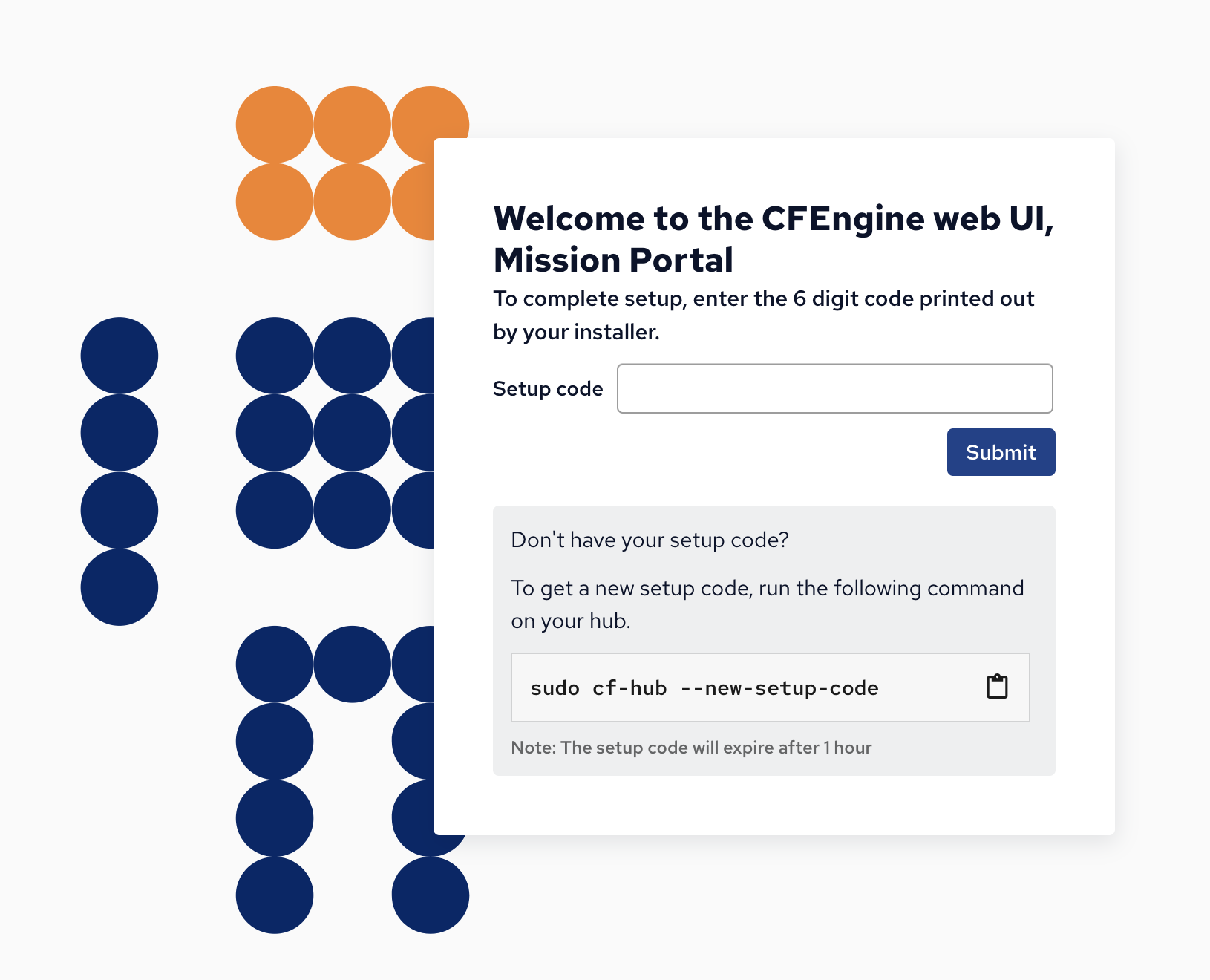
Mission Portal first time setup
CFEngine’s web UI, Mission Portal, no longer has a default admin user and password.
During installation, you will receive a 6 digit setup code to use when logging in for the first time.
With this code, you will create the first admin user and specify its password.
The username does not have to be admin, it can be any valid username, we recommend creating individual accounts for each administrator.
Audit logs
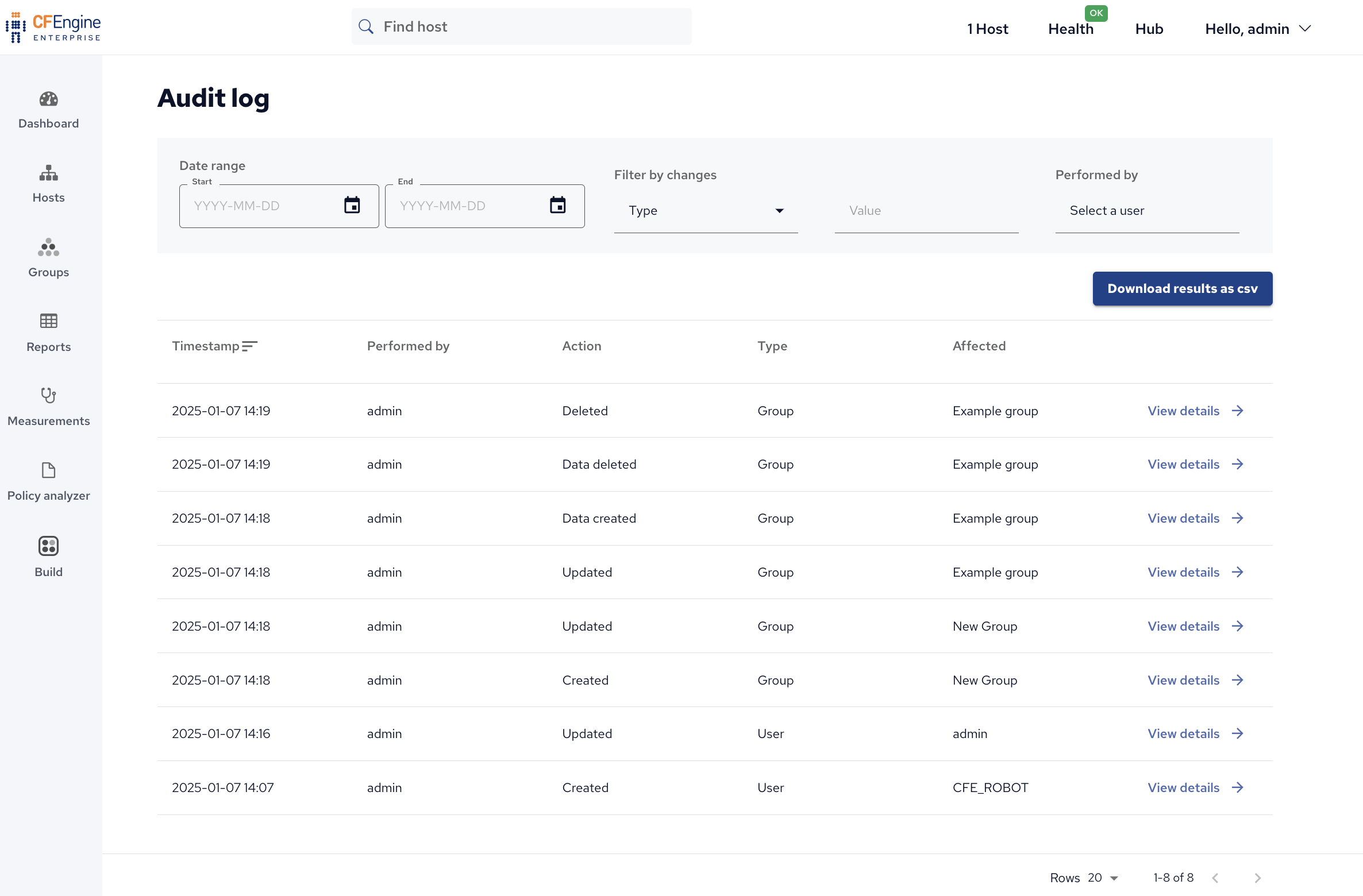
Our new audit logs show security-relevant events. In short, they summarize who changed what and when. This information is especially useful for auditing or during incident response.
New variables and functions available in policy language
For policy writers, we have added some new functions and variables for your convenience:
classfilterdata(data_container, data_structure, key_or_index)- Filter a data container (JSON) using class expressions.findlocalgroups(filter)- Returns a data container of all local groups with their attributes that are matching a filter. If no filter is specified, it will return all the local groups.findlocalusers(filter)- Returns a data container of all local users with their attributes that are matching a filter. If no filter is specified, it will return all the local users.getacls(path, type)- Return the Access Control List (ACL) for a given file- or directory path.getbundlemetatags(bundlename, optional_tag)- Returns the list of meta tags for bundle bundlename.getgroupinfo(optional_gidorname)- Returns information about the current group or any other, looked up by group ID (GID) or group name.getgroups(exclude_names, exclude_ids)- Returns a string list of group names on the system, with options to exclude specific names or IDs.hostswithgroup(group_name, field)- Returns a list from the CFEngine Database with the information field of all hosts sharing the group group_name.is_type(var, type)- Returns whether a variable var is of type type.isconnectable(hostname, port, timeout)- Checks whether a port is connectable.isnewerthantime(file, time)- Returns whether the file file is newer (modified later) than the time time.useringroup(user)- Return whether a user is a member of a given group.
Breaking changes
From time to time, we need to change the behavior of certain features of CFEngine in a way that is not completely backwards compatible.
This is usually to address security concerns, bugs causing issues for our users, or features behaving in really unexpected or unintended ways.
In such cases, we try to communicate the changes with users, along with what is needed from them (such as adjusting their policy, reports, or API usage).
Please take a look at the recent change-in-behavior blog posts, and stay up to date on these via our blog:
https://cfengine.com/tags/change-in-behavior/
Platform support
In order to focus on the platforms most widely used by our users, these platforms will no longer be supported in 3.27 and future versions:
- Solaris
- IBM AIX
- HP-UX
- SUSE
- Debian 11
If you need support for any of the mentioned platforms, this is available as part of an Extended platform support agreement. Contact us for more details.
We are also dropping hub support for the following platforms:
- RHEL 7
- Ubuntu 20.04
This means you can still run CFEngine on machines with RHEL 7 and Ubuntu 20.04, but you will need a newer operating system on your hub(s).
Release announcements for non-LTS releases
There are other big changes introduced in the past 1.5 years, but not shown here. We encourage you to read our previous release blog posts to see more of these changes:
Changelogs
As always, you can see a full list of changes and improvements in our changelogs:
- 3.27.0 Changelog for CFEngine Community
- 3.27.0 Changelog for CFEngine Enterprise
- 3.27.0 Changelog for Masterfiles Policy Framework
If you are upgrading from the 3.21 LTS series, scroll down in the changelog to find changes from the earlier 3.22 and 3.23 releases. Please note that the Enterprise changelogs contain only changes specific to Enterprise. To get a full overview of all changes in a version, read all 3 changelogs.
Dependency updates
We update dependencies to ensure we have the latest security fixes in the libraries and tools used in CFEngine. The table below shows our dependencies and their versions, with version 3.26.0 for comparison:
| CFEngine version | 3.26.0 | 3.27.0 |
|---|---|---|
| Apache | 2.4.63 | 2.4.66 |
| APR | 1.7.5 | 1.7.6 |
| apr-util | 1.6.3 | 1.6.3 |
| diffutils | 3.12 | 3.12 |
| Git | 2.49.0 | 2.52.0 |
| leech | 0.1.24 | 0.2.0 |
| libacl | 2.3.2 | 2.3.2 |
| libattr | 2.5.2 | 2.5.2 |
| libcurl | 8.13.0 | 8.17.0 |
| libcurl-hub | 8.13.0 | 8.17.0 |
| libexpat | 2.7.1 | 2.7.3 |
| libgnurx | 2.5.1 | 2.5.1 |
| libiconv | 1.18 | 1.18 |
| librsync | 2.3.4 | 2.3.4 |
| libxml2 | 2.14.3 | 2.15.1 |
| LibYAML | 0.2.5 | 0.2.5 |
| LMDB | 0.9.33 | 0.9.33 |
| nghttp2 | 1.65.0 | 1.68.0 |
| OpenLDAP | 2.6.9 | 2.6.10 |
| OpenSSL | 3.5.0 | 3.6.0 |
| PCRE2 | 10.45 | 10.47 |
| PHP | 8.4.7 | 8.5.1 |
| PostgreSQL | 17.5 | 18.1 |
| pthreads-w32 | 2-9-1 | 2-9-1 |
| rsync | 3.4.1 | 3.4.1 |
| SASL2 | 2.1.28 | 2.1.28 |
| zlib | 1.3.1 | 1.3.1 |
Thank you to all the developers and maintainers of Open Source Software which make CFEngine possible!
Downloads
CFEngine Enterprise is free for up to 25 hosts, click here to go to the download pages with new packages.
If you are using cf-remote, it will now default to 3.27.0, since this is the latest LTS release available.
Contributions
We encourage all of our users to get involved in the community and contribute. Feel free to use one of the following avenues:
- Ask for help, share an idea, or start a discussion on GitHub Discussions
- Contribute modules to CFEngine Build
- Look through our curated list of issues for new contributors
- Improve the documentation by fixing typos, adding examples, or explaining things you found difficult
- Browse the code or submit a pull request through GitHub
- Submit a bug report or feature request in our issue tracker


